
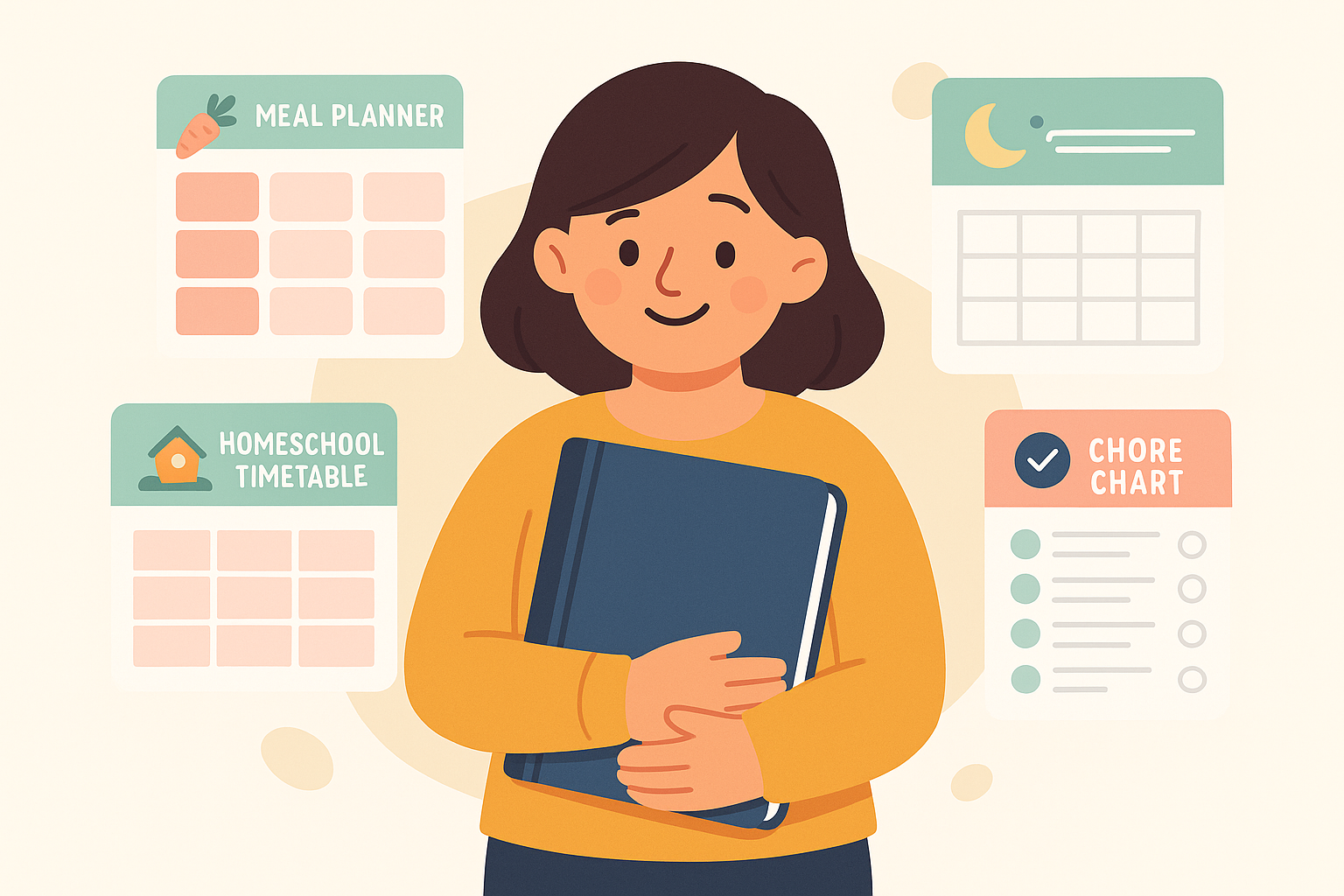

The mental load is real. Last Tuesday I packed a lunch, ordered pull-ups, defrosted chicken, and still forgot the library books on the counter. If you’ve had a week like that, you’re not failing. Your brain is just full.
We built this planner hub to make life feel lighter. One spot for the tools that actually help: simple printables, a few great notebooks, and digital apps that don’t create more work. Nothing fussy. Nothing you’ll abandon by Friday.
Here’s the truth. The best planner is the one you can see and will use daily. That might be a single sheet on the fridge, a color-coded shared calendar, or a notebook you toss in the diaper bag. We’ll help you pick, then give you ready-to-print pages and our favorite apps so you can start today.
We also care about low-stress and low-tox choices. If you want to laminate a chore chart, we note safer materials and low-odor markers. If you prefer digital, we call out privacy settings and offline options.
Quick Comparison


Do this first: pick one routine that trips you up most. Meals, naps, lessons, chores, or the daily schedule. Print one page or set up one shared view. Tape it where your eyes land most. Small start, big relief.
Edge cases we see often: shift-work families who need two versions of the week, and split households where handoff days need extra clarity. We’ve included tips for both so your system holds up in real life.
Quick links: jump to what you need
- Meal planner for families: printables + apps
- Baby + toddler sleep trackers (paper + app)
- Homeschool lesson planners
- Chore charts + cleaning schedules
- Daily + printable family planner (calendars + routines)
- Best digital planner apps for families (at-a-glance)
- Printing + setup tips (low-stress, low-tox)
- Buying guide: printable vs physical notebooks vs digital
- Free downloads: Family Planner Bundle
- Related guides to bookmark
How to choose a parent planner (printable vs app vs notebook)
When a printable is your best friend
Choose a printable if you want zero friction. You print it, you use it, you see it. Great for meal plans, chore charts, visual sleep logs, and weekly family overviews posted at kid-eye level. Look for:
- Clear, roomy boxes you can actually write in
- Black-and-white or ink-light designs to keep printing simple
- Editable PDFs if you like typing first, then printing
- Sizes that match your setup: letter for the fridge, half-sheet for a binder, or A5 if you carry it
- Reusable surfaces if you plan to laminate and use wet-erase markers
Limits to know: printers jam on heavy cardstock, and laminated pages can glare under kitchen lights. If your family splits time between homes, keep a second set printed and ready to go.
Action step: print a one-week meal grid and pin it with painter’s tape near the pantry. Write in dinners before you shop.
When a paper notebook wins
A bound planner is best if you think better on paper and want everything in one place. No logins. No battery. Ideal for homeschool lesson plans, memory-keeping, and quick habit checks. Prioritize:
- Lay-flat binding you can write in one-handed
- Thick paper that won’t bleed with your favorite pen
- Simple weekly spread with a sidebar for meals or tasks
- Undated pages if you skip weeks without wasting paper
- A pocket for loose chore tickets or coupons
Limits to know: a notebook can disappear in a backpack and it won’t ping anyone about soccer pickup. If multiple caregivers need to see the plan, pair it with a simple fridge sheet.
Action step: mark recurring anchors first. School start, naps, sports, and bedtime. Then build meals and chores around those fixed points.
When a digital app keeps everyone aligned
Go digital if your crew needs shared visibility and reminders. Perfect for co-parents, caregivers, and older kids with phones. What matters most:
- Shared calendars with color-coding by person
- Lists that sync fast and work offline
- Privacy controls and export options for your data
- Widget or lock-screen views so you glance and go
- Easy event templates for repeated routines like bedtime or lesson blocks
Limits to know: screen fatigue is real, and some apps bury features behind too many taps. If your toddler thrives on visuals, you still need a paper chart at their height.
Action step: create one shared “Family” calendar and color each person. Add two repeating events right now: the weekly grocery block and Sunday reset.
1. 8.5×11 Family Organizer Binder – Household & Life Planner
Best Overall Family Planner
Juggling family life? This all-in-one binder corrals meals, bills, chores, and docs in one spot—durable, expandable, and stress-saving. Take a peek to see how it works.
$29.99 on Amazon
Price and availability are accurate as of 04/25/2026 06:08 pm GMT and are subject to change.
If you want one home base for family life, this binder nails it. It’s sized for standard printer paper, so you can drop in meal plans, bill checklists, chore charts, and important documents without fighting margins or tiny boxes. It’s the paper command center that actually corrals the chaos.
We picked it because it’s durable and expandable, which means you’re not stuck with a preset layout. Add pages when soccer season starts. Pull out sections when school’s out. It’s simple, flexible, and easy to customize. If you want a peek inside before you commit, see the details here: 8.5×11 Family Organizer Binder – Household & Life Planner.
The trade-offs: it’s bigger than a spiral planner and it won’t ping you with reminders. You’ll also need to print pages and hole-punch them. If you prefer everything on your phone, go with an app instead.
Tip: set up four core tabs to start—Meals, Money, Schedules, Home. Keep a pen pouch clipped in front, and schedule a 10-minute Sunday reset to swap in fresh weekly pages. That tiny ritual keeps the binder working instead of gathering dust.
2. Global Printed Products Weekly Family Planner, 52 Undated Weeks (13 x 17)
Best Budget Pick
Family-sized 13×17 weekly planner: big spaces for meals, projects, and shopping lists. See everyone’s week at a glance—hang it or desk it. Want a closer look?
$15.99 on Amazon
Price and availability are accurate as of 04/25/2026 12:08 am GMT and are subject to change.
If you want a big, at-a-glance plan everyone can see, this weekly pad keeps the whole crew on the same page. The 13 x 17 size leaves real room for meals, projects, and a shared shopping list. It works well in a kitchen command center or parked on a desk.
We picked it because it is undated, so you can start any week and skip weeks without wasting pages. The layout is clean and obvious. No learning curve. Just write, stick it up, and you are set for the week.
Trade-offs: it is large and not portable. There is no app syncing or reminders. It is a paper pad, so pages are single-use unless you slip one into a clear protector.
Practical tip: color-code by person and snap a quick photo on Sunday night so you have it on your phone. Want a closer look? Peek at the layout here Global Printed Products Weekly Family Planner, 52 Undated Weeks (13 x 17).
3. Decorably Magnetic Weekly Meal Planner for Fridge, 52 Undated Tear-Off Sheets with Grocery List (7×10, Pastel Rainbow)
Best Meal Planning Pick
Stick it to your fridge and plan a stress-free week: strong magnets, B/L/D sections, tear-off categorized grocery list, and 52 colorful sheets. Want simpler meals?
$6.99 on Amazon
Price and availability are accurate as of 04/25/2026 03:09 am GMT and are subject to change.
If you want meal planning to live where your family actually looks, this fridge pad is it. The weekly layout with clear Breakfast, Lunch, and Dinner boxes makes decisions faster. The strong magnets matter. It sits flat, so pages do not curl or slide when someone grabs a snack.
We picked Decorably Magnetic Weekly Meal Planner for Fridge, 52 Undated Tear-Off Sheets with Grocery List (7×10, Pastel Rainbow) because the tear-off, categorized grocery list is the real timesaver. Plan at the fridge, rip the list, and head out. No copying meals into an app while a toddler asks for crackers again. The 52 undated sheets mean a year of planning without overthinking dates.
Trade-offs: at 7×10, there is not tons of room for notes or long recipes. It is paper, so you cannot wipe and reuse. If you like to keep a record, you will need to file pages or snap a quick photo.
Tip: use a bold pen or fine-tip marker for better contrast on the pastel blocks. Before you tear off the week, take a phone photo. It keeps your plan handy and your history saved without extra work.
4. schoolnest Nature Series Minimalist Homeschool Lesson Planner (Undated 12-Month/52-Week)
Best Homeschool Lesson Planner
Price and availability are accurate as of 04/25/2026 09:08 am GMT and are subject to change.
If you want a simple paper homeschool planner that won’t boss you around, schoolnest Nature Series Minimalist Homeschool Lesson Planner (Undated 12-Month/52-Week) is our favorite. It’s undated, so you can start mid-year or pause for travel without wasting pages. The minimalist layout keeps the focus on lessons, not stickers.
We picked it because it covers a full school year by month and week without getting fussy. The pages are open enough for block scheduling, time slots, or loop plans. That flexibility makes it easy to adapt across ages and subjects.
The trade-offs are real. There’s no app sync or sharing, and you’ll write in dates yourself. If you crave pre-labeled subject boxes and prompts, the clean design may feel too bare.
Tip: assign a highlighter color to each kid and mark weekly goals right on the page. Add slim sticky tabs for each month so you can flip fast during morning time. Pencil beats pen when plans change.
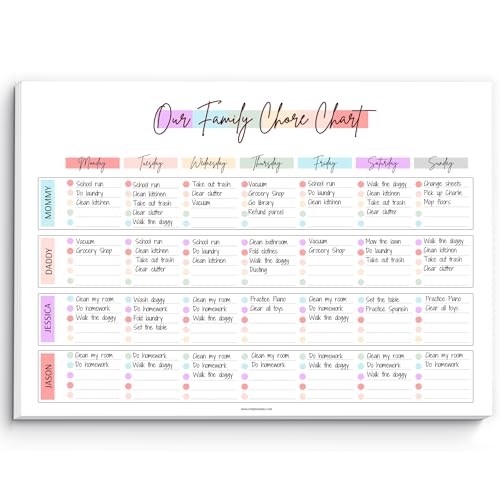
5. A4 Rainbow Family Chore Chart Notepad, 50 Undated Tear-Off Sheets
Best chore chart system
Family life, simplified: undated weekly pages (50 sheets) to assign chores, see the week at a glance, and tick off wins—printed on premium 120gsm paper. Start anytime.
$13.99 on Amazon
Price and availability are accurate as of 04/25/2026 12:10 pm GMT and are subject to change.
Best for families who want a low‑friction, visible system kids can actually follow. If you want a simple weekly reset, A4 Rainbow Family Chore Chart Notepad, 50 Undated Tear-Off Sheets keeps everyone aligned without an app.
We picked it for the clear, undated weekly pages you can start any week of the year, plus 50 sheets that make it easy to keep momentum going. The A4 size reads well from across the kitchen, and the 120gsm paper feels solid when you’re checking off wins.
Trade‑offs: it’s paper. No reminders, and you’ll use sheets up over time. If you like to archive progress, snap a quick photo before you tear off the old week.
Practical tip: pop it in a magnetic frame on the fridge or clip to a simple clipboard. Give each person a highlighter color so tasks stand out, and leave a small reward box at the bottom for weekend motivation.
6. ApoloSign 15.6-inch Touchscreen Family Calendar with Google Play
Best shared digital hub
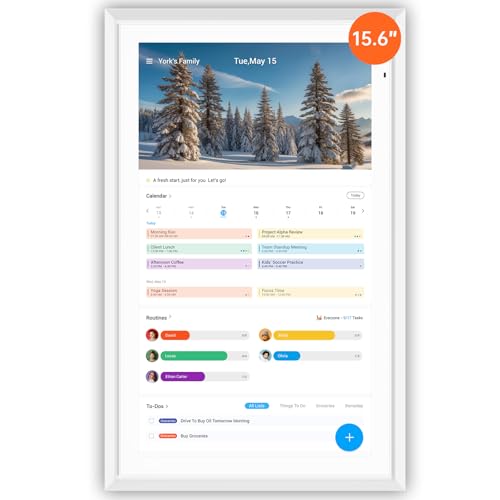
Turn your wall into a family HQ: auto-sync calendars, reward chores, plan meals, control smart home, and showcase photos—on a 15.6” touch display. Curious? Tap to explore.
$299.99 on Amazon
Price and availability are accurate as of 04/25/2026 09:11 pm GMT and are subject to change.
This is for families who want a visible command center that everyone actually checks. If you’ve tried paper calendars and group texts and still miss pickups, ApoloSign 15.6-inch Touchscreen Family Calendar with Google Play gives you a single spot for calendars, chore rewards, meal plans, smart home shortcuts, and favorite photos on a 15.6-inch touch display.
We picked it because it pulls the daily swirl into one place. Auto-syncing calendars cuts down on “Wait, what time?” threads. Having chores and meal planning right next to the schedule helps kids see what’s expected and what’s for dinner without asking. Smart home control on the same screen is a nice bonus when you’re juggling bedtime lights and white noise.
Trade-offs: it’s a screen in a shared space, so you’ll want to be thoughtful about what shows. It relies on Wi-Fi and app accounts, and setup takes a bit to get right. You also need a spot with power and a plan for notifications so it doesn’t feel noisy.
Practical tip: mount it where kids can tap their chores but can’t wander into settings. Keep only the essentials on the home screen. Color-code each person’s calendar, and do a 10-minute Sunday reset to add meals, rewards, and the week’s big rocks.
FAQ
Setup
How do I start if everything feels chaotic?
Pick one pain point, not five. Start with a simple weekly meal plan and a shared family calendar. Do a 10-minute Sunday reset, post it where everyone sees it, and call it good enough.
How do I print so pages fit my binder or fridge?
Choose Letter or A4 in your printer settings and print at 100 percent. For half-size binders, print two per page and cut down the middle. Use slightly thicker paper for durability, or slip pages into sheet protectors and use dry erase markers on top.
Troubleshooting
No one is checking the planner. What now?
Tie it to a routine you already do, like dinner or bedtime. Hold a quick weekly huddle, assign colors to each person, and set one phone reminder. Keep the board in a high-traffic spot and limit it to the essentials so it earns attention.
Buying decisions
Printable, notebook, or app. Which one is best for a family?
Printables are flexible, cheap, and great for fridge visibility. Notebooks feel satisfying and keep everything in one place, but they are harder to share. Apps make sharing and reminders easy when multiple adults are juggling pickups, meals, and naps. Many families like a hybrid: a fridge planner for the week and an app for real-time updates.
If your brain is carrying the whole family calendar, meals, sleep, school, and chores, you are not failing. You are overloaded. A simple planner setup takes some of that load off your head and puts it on paper or in an app you can share.
The big idea is small. Pick one home base. Add one helper page. Do one short family sync. That combination covers most of the chaos without you becoming the admin of everything.
Progress counts more than pretty. Cross things out. Change your mind. Use a pencil. Your planner should flex to your week, not the other way around.
Build your simple system for next week
A planner that works is one you actually touch. Start with this, then adjust.
Quick-start checklist
- Pick a base: printable weekly planner, a physical notebook, or one shared app.
- Add one helper: meal plan, sleep log, chore chart, or homeschool lesson grid.
- Set a 10-minute Sunday sync. Who is doing what, when, and what is for dinner.
- Post it where eyes land. Fridge, hallway hook, or the first screen in your app.
- Keep a capture spot. One sticky note or a single app list for brain dumps.
- Protect two routines. One family meal and one rest block you do not move.
Choose your base planner
If you like markers and seeing the week at a glance, tape a printable weekly layout to the fridge or keep a slim notebook open on the counter. If your crew lives on phones, set a shared calendar as the home screen widget and star it. One home base avoids the where-is-that list problem.
Add one helper page
Pick the pain point. Hungry 5 p.m. meltdowns mean a meal plan. Multiple night wakes mean a simple sleep log. Chore standoffs mean a clear, age-appropriate chart. Homeschool shuffle means a one-page lesson grid. One helper page fixes one problem now.
Do a 10-minute family sync
Keep it short. Name the dinner plan, events, rides, and one house task per person. Ask what might blow up the week and plan a backup dinner. Snap a photo of the plan so the group text has it too. Done.
Decision recap and edge cases
You do not need every tool. You need the right format for your brain and your family.
When printable wins
- You want zero screens and instant visibility.
- Kids do better with a chart they can touch and check.
- You like tossing last week and starting fresh without flipping pages.
Tip: Print on thicker paper so markers do not bleed. Slip chore or meal pages in a sheet protector and use a washable marker.
When a physical notebook is smarter
- You want everything in one place you can carry.
- You like jotting quick notes next to plans.
- You need privacy that does not depend on logins.
Tip: Use simple tabs. One for week, one for meals, one for school. A paperclip moves your current week so you can flip fast.
When to go digital first
- You need real-time updates across adults or caregivers.
- You rely on reminders or recurring events.
- You share custody or manage shift work and want fewer handoffs.
Tip: Create one shared family calendar and keep personal events separate but visible. Set gentle alerts a few hours ahead, not five minutes.
Special cases that change the setup
- Neurodivergent parent or child: Keep layouts consistent. Use high-contrast, minimal designs. Avoid busy colors. Pair digital reminders with one visible paper plan.
- Shift workers or rotating custody: Plan in two-week blocks. Color-code by person. Lock in anchor routines like bedtime windows and a weekly prep hour.
- Tiny kitchen or no printer: Use a reusable whiteboard for meals and chores. Take photos of the board. Store them in a shared album named Week Plans.
- Privacy needs: Skip cloud notes for health or school details. Keep sensitive info in a paper notebook or a digital app with strong local-only settings.
If you are overwhelmed, start with one printable weekly plan and a freezer-friendly meal list. If tech clicks for you, set up one shared calendar and add the meal plan as a recurring note. Either way, schedule the 10-minute sync and protect it like an appointment.
Want a head start? Download the free Family Planner Bundle, print the pages you need, and stick them on the fridge. Or drop the digital versions into your app of choice. When you are ready to go deeper, grab the meal planning templates and the sleep trackers from our tools page. Small steps. Lighter load. More calm at 5 p.m.



Leave a Comment